ITS
Welcome to the ITS knowledge Base.
Here you will find general information about ITS
Welcome
Welcome to the ITS Knowledge Base.
Your "One-Stop" location for knowledge about everything ITS has to offer.
If you cannot find what you are looking for, please feel free to reach out to us at servicedesk@it-s.co.za and we would be glad to assist you.
How to use this Knowledge Base
- Located at the top of the page, breadcrumbs display the path from the home page to the current content item, allowing users to navigate up the hierarchy by clicking on any level.
- The sidebar on the left provides a visual representation of the book structure, allowing users to expand and collapse sections, and jump directly to specific chapters or pages within the book.
- This sidebar also includes a search bar for finding content within the current book.
3. Search:
- A global search bar is available in the header for searching across all content in the knowledge base.
- Search bars are also available within the book and chapter views for more focused searches.
4. Next/Previous Links:
- Below the main content, "Next" and "Previous" links allow users to move sequentially through the pages and chapters within the current book.
5. Shelves and Book Level Navigation:
- Shelves are used to organize books, and users can navigate between shelves and books within them using the navigation menu in the header.
- Clicking on a shelf or book in the navigation menu will display its contents.
About
About ITS
History & Credentials
ITS was born in 1998 when Manuela Saraiva saw a Gap in the market for media systems that could actually perform. ITS chose to use Microsoft Dynamics as the base financial system as it is a stable trusted application with a strong implementation. Since the core base was customizable, it made sense not to re-invent the wheel.
The MEVision software is a fully integrated 'end-to-end' solution that was then developed in the same technology for a modern Media, Advertising, Outdoor and Activation agency software system.
The continuous evolution of the system is based on our client’s needs, which continue to change and mature.
ITS has a partnership with Microsoft to provide our clients piece of mind in providing long term stable and supported solutions.
Sample Page
This is a sample page to show the capabilities of Bookstack
Text Manipulation
Text can be Bold, Italic, Underline, Strikethrough with superscript and subscript
The System also supports inline code: This is an inline code block.
Colored Text as well is highlighting can also be done
Bullets, Tasks and Indentations
Buller Lists
- Item 1
- Item 2
- Item 3
Numbered Lists
- Item 1
- Item 2
- Item 3
Task Lists
- Task 1
- Task 2
- Task 3
Indented Text
Indented Text can be controlled
over multiple lines.
Links and Hyper Links
Links to websites like this: BooksStack Documentation is also possible. You can also create Links to other pages within the Bookstack application like this: Welcome
Tables
Complex Tables are supported
| Header1 | Header2 | Header3 | Header4 |
| Value 1 | Value 2 | Value 3 | Value 4 |
|
Welcome | Text can be Bold, Italic, Underline, |
|
Advanced Abilities
Some Advanced Abilities
Images
Code Blocks
            try
            {
                var fields = GetFields(configModel, tableID);

                var stripCharList = stripChars.Split('|');

                JArray jArray = new JArray();
                string con = "Server=" + configModel.SQLServer + ";Database=" + configModel.Database + ";integrated security=true;";
            }
Drawings

Videos
Collapse Blocks
Code
try
{
var fields = GetFields(configModel, tableID);
var stripCharList = stripChars.Split('|');
JArray jArray = new JArray();
string con = "Server=" + configModel.SQLServer + ";Database=" + configModel.Database + ";integrated security=true;";
}
Call Outs
Info
Success
Warning
Error
Customizing Code
change the html behind the page
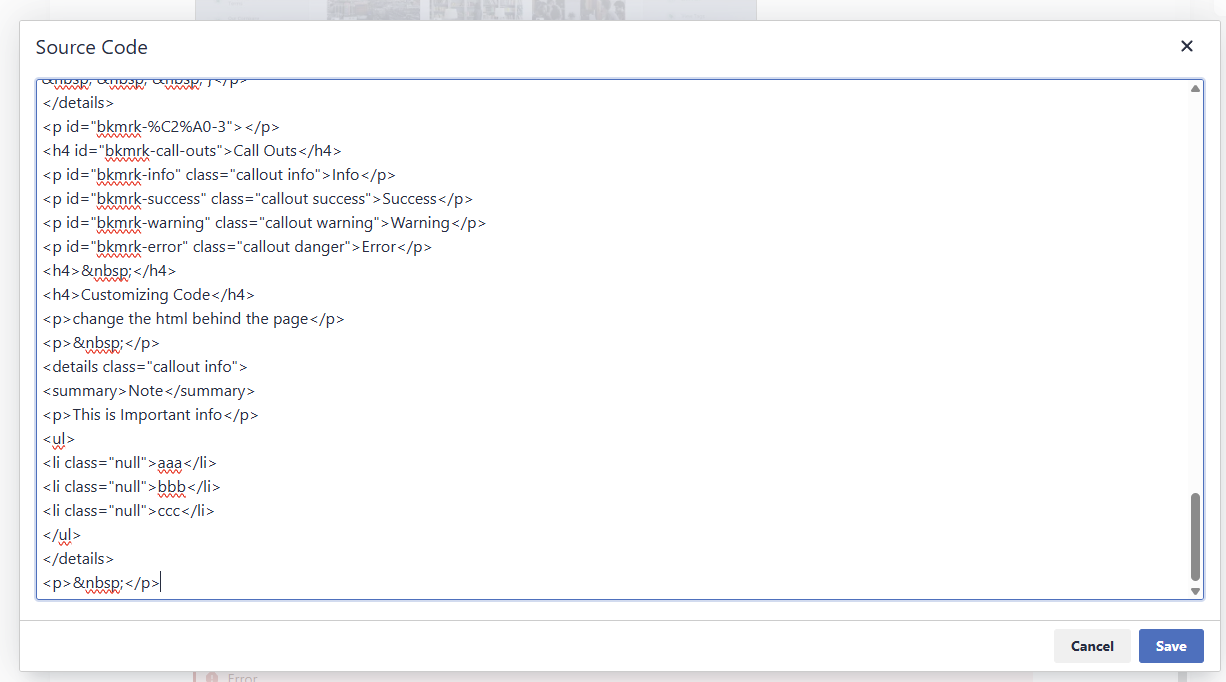
Example:
Note
This is Important info
- aaa
- bbb
- ccc